Lazy Mike's Staff Texts
Text messages Lazy Mike's sends to its own employees about their work. No marketing.
Who sends them
Lazy Mike's Delicatessen, doing business as Lazy Mike's. The texts come from our staff app, staff.lazymikesdeli.com.
Who gets them
Only employees of Lazy Mike's who agreed to them in the staff app. There is no public sign-up form: only an employee signed in to their own account can opt in.
What the texts are about
- Their schedule when it is posted or changed.
- Shift reminders.
- An alert if they have not clocked in for a scheduled shift.
- Answers to their shift swap, cover and time-off requests.
- Sign-in codes for the staff app (only when the person asks for one).
- Urgent messages from a manager, and staff updates (closures, schedule changes, meetings).
Texts only: no automated phone calls. Links go only to our own addresses, never to a link shortener.
Examples
Lazy Mike's: Your shifts for the week of Nov 2: Mon 7-3, Wed 11-7, Sat 7-3 Reply STOP to opt out.
Lazy Mike's: Reminder: you work tomorrow, 7:00 AM - 3:00 PM. Reply STOP to opt out.
Lazy Mike's: Hi Sam, your 7:00 AM shift is starting and we don't see you clocked in yet. Already here? Please clock in. Reply STOP to opt out.
Lazy Mike's: Approved: Time off Nov 14-16. Reply STOP to opt out.
Lazy Mike's: We open at 11 tomorrow because of the snow. Reply STOP to opt out.
How often
Message frequency varies, up to 30 messages per week per person. Message and data rates may apply.
How an employee opts in
- A manager creates the employee's account. The employee signs in to the staff app on their own phone.
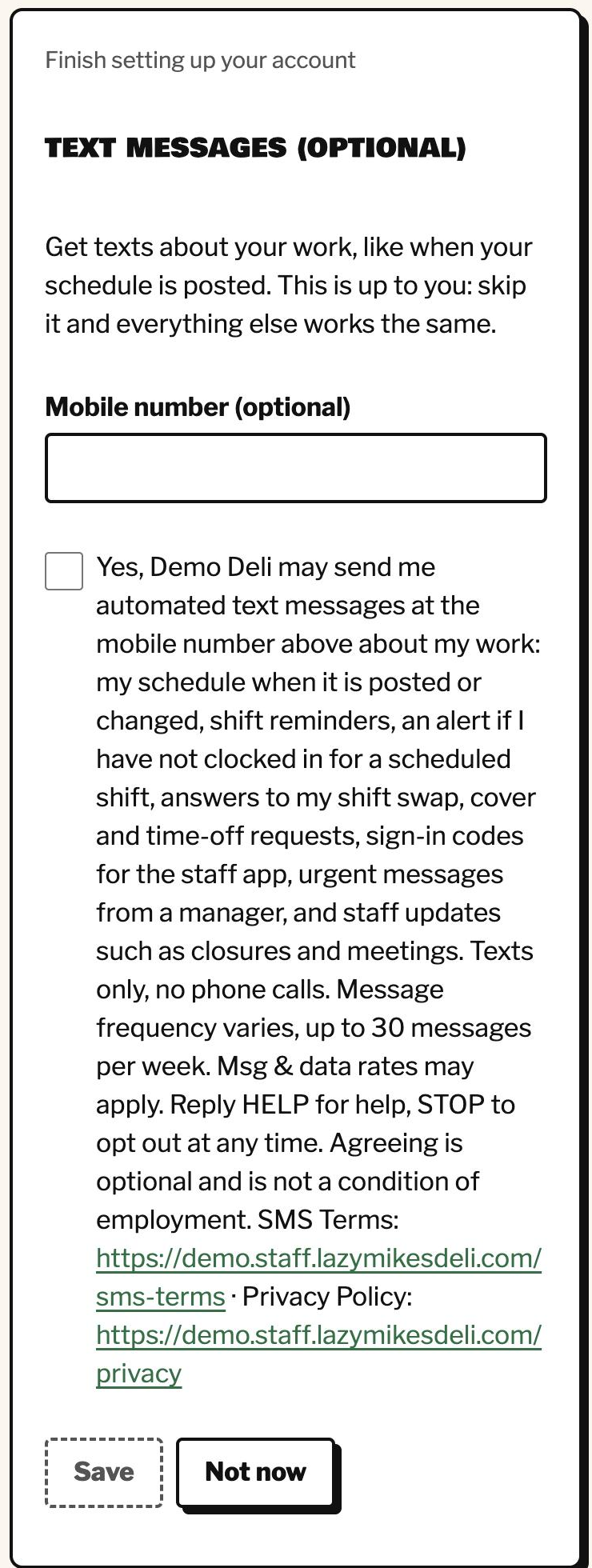
- On the first sign-in, account setup shows an optional "Text messages" step: a field for their mobile number and one unticked box with the words below. The links to the SMS Terms and the Privacy Policy are inside those words.
- They can tap "Not now" and finish setup without giving a number: nothing else depends on this step, and agreeing is not a condition of employment.
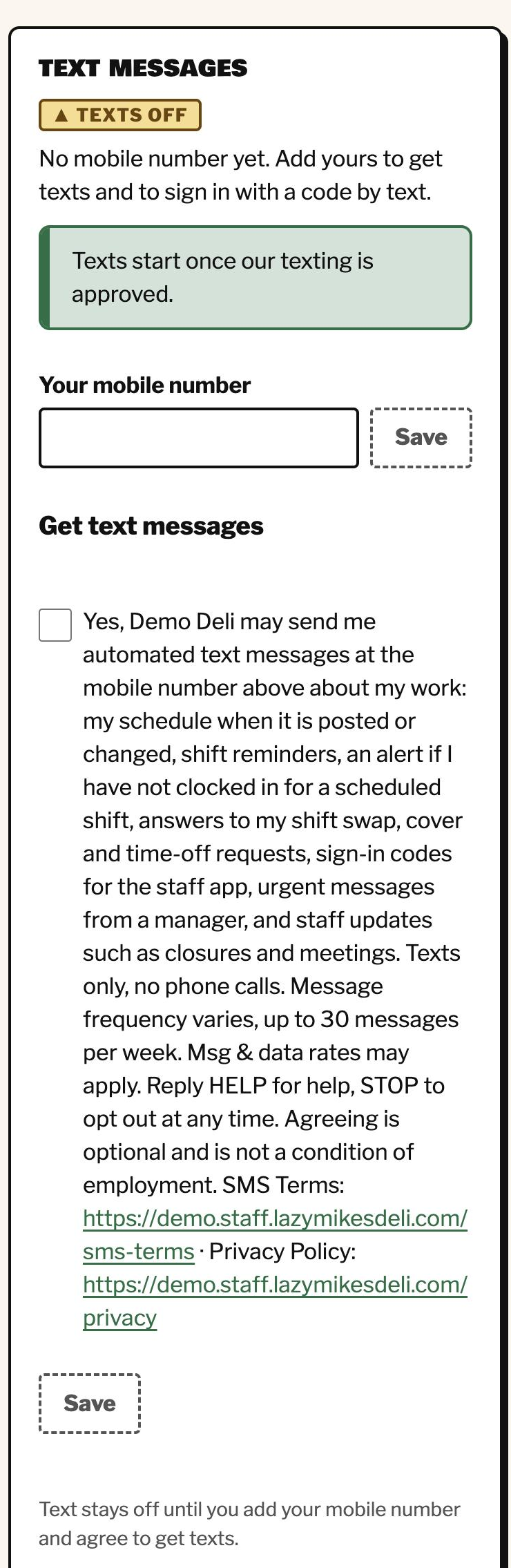
- The same box is always in "My account > Text messages", to agree later or to stop.
- We keep the exact words the person saw, the version (2026-10-26), the number and the time as proof. Texts start only after the person confirms their number with a code.
The exact words next to the box
Yes, Lazy Mike's may send me automated text messages at the mobile number above about my work: my schedule when it is posted or changed, shift reminders, an alert if I have not clocked in for a scheduled shift, answers to my shift swap, cover and time-off requests, sign-in codes for the staff app, urgent messages from a manager, and staff updates such as closures and meetings. Texts only, no phone calls. Message frequency varies, up to 30 messages per week. Msg & data rates may apply. Reply HELP for help, STOP to opt out at any time. Agreeing is optional and is not a condition of employment. SMS Terms: https://staff.lazymikesdeli.com/sms-terms · Privacy Policy: https://staff.lazymikesdeli.com/privacy
In Spanish (the box shows the person's language)
Sí, Lazy Mike's puede enviarme mensajes de texto automáticos al número de celular de arriba sobre mi trabajo: mi horario cuando se publica o cambia, recordatorios de turno, un aviso si no he marcado mi entrada en un turno programado, respuestas a mis solicitudes de cambio, cobertura y tiempo libre, códigos para entrar a la aplicación del personal, mensajes urgentes de un gerente y avisos al personal como cierres y reuniones. Solo mensajes de texto, sin llamadas. La frecuencia varía, hasta 30 mensajes por semana. Pueden aplicar tarifas de mensajes y datos. Responde HELP para recibir ayuda o STOP para cancelar en cualquier momento. Aceptar es opcional y no es una condición de empleo. Términos de SMS: https://staff.lazymikesdeli.com/sms-terms · Política de privacidad: https://staff.lazymikesdeli.com/privacyScreenshots (demo restaurant, made-up data)
Help and stopping
Reply HELP for help. Reply STOP (or STOPALL, UNSUBSCRIBE, CANCEL, END, QUIT) at any time to stop all texts: we confirm once and send nothing more. To start again, reply START or agree again in "My account". Employees can also tap "Stop all texts" in "My account > Text messages".
More: SMS Terms · Privacy Policy.